
What the evidence says, what is actually moving, and what to check before a cutover.
Some are. Almost none are doing it all at once, and the EHR is usually the last thing to move, if it moves at all.
The reality is less exciting than the headlines, but it is what the evidence supports. We couldn’t find a hospital-only adoption figure worth quoting, so this post sticks to what can be checked: survey data, analyst forecasts, and health systems that have said publicly what they did, and the scope of a pilot iShift is supporting.
What the Evidence Shows
Across industries, the exit is real but slow. CloudBolt’s February 2026 survey found that 86% of VMware customers are actively reducing their footprint, while only 4% have fully migrated away. More than half are staying on VMware and shrinking their dependence in phases. The destinations overlap: public cloud IaaS (72%), Hyper-V or Azure Stack (about four in ten) and SaaS replacements (34%) all showed up, so most organizations are using more than one landing zone.
Gartner expects more than a third of VMware workloads to be running somewhere else by 2028. Read the fine print, though. Gartner analyst Julia Palmer, speaking at the firm’s Australian symposium in September 2025, advised against moving everything (a full exit takes three years or more) and recommended re-platforming selected applications instead. She also said none of the alternatives is worth the effort if cutting cost is the only goal. Her ranking put Nutanix first and public cloud second, with Azure Local third and Windows Server with Hyper-V fourth. “We are all addicted to hypervisors,” she said, which may be the most honest sentence anyone has said about this market.
That ranking is fair, and it is the right frame for a hospital. Hyper-V is not a universal VMware replacement. It is a strong answer for a specific slice of the estate, especially if you already own the Microsoft licensing. (Azure Local is Microsoft’s new name for Azure Stack HCI, changed in November 2024, so older material may use either.) Gartner also flagged a 16-host ceiling on Azure Local clusters in 2025. Microsoft says its April 2026 release lifts that for SAN-backed deployments, so check current limits against your design.
Palmer’s line about hypervisors is the part worth keeping. Moving from VMware to Hyper-V changes who you pay, but it does not end the dependence, and it is fair to ask whether a hospital that swaps one hypervisor vendor for another has solved anything. It has if the move cuts cost and leaves you with options: workloads and dependencies documented, a migration process you have run before, and fewer applications tied to any one platform’s features. That is the test for any move, including this one.
Health systems are making exactly this kind of selective move. Vizient’s 2025 analysis for providers described organizations stuck at renewal after steep cost increases, and profiled a multi-facility California health system moving a substantial portion of its environment to Hyper-V and Azure, keeping some legacy applications on premises, with the goal of ending its Broadcom spend. Vizient’s verdict on the effort: comparable to migrating a data center. Other systems picked other destinations. Oregon’s Legacy Health moved to Nutanix, according to Nutanix’s case study, and a multi-hospital system in a United Layer case study kept vendor-certified clinical applications on VMware while moving portals, scheduling and integration services to KVM in waves.
Even though the destinations differ, the pattern is pretty much the same:
- move what is safe,
- keep what is certified,
- do it in stages.
Why Hospitals Can’t Just Absorb the Renewal
Hospitals leaving VMware have more than one place to go and Gartner ranked Windows Server with Hyper-V behind Nutanix and public cloud. So why does Hyper-V keep showing up? Advisors who write about this, such as Vizient and T2 Group, give practical not technical reasons:
- It is mostly already paid for. Hyper-V comes with Windows Server and Datacenter licensing covers unlimited VMs on each licensed host. If you already have that, the hypervisor line item largely disappears. (Confirm your agreement. See gate 2 below.)
- It fits the Microsoft environment you already run. Active Directory, Windows infrastructure and Azure hybrid options all sit on the same stack.
- Disaster recovery gets cheaper. Hyper-V Replica and Azure Site Recovery can take over the job VMware Site Recovery Manager does today, and an Australian hospital case study credits Azure Site Recovery with lower DR costs.
- It supports a phased move. Non-clinical workloads go first. Latency-sensitive clinical systems stay on premises while you learn how the new platform behaves.
What isn’t included on the list is performance. Nobody should pitch Hyper-V to a hospital CIO as the technically superior hypervisor and Gartner’s lukewarm view that Microsoft “is not in love with it” is a reason to go in with open eyes.
The case for Hyper-V is cost and fit.
The Two-Track Architecture
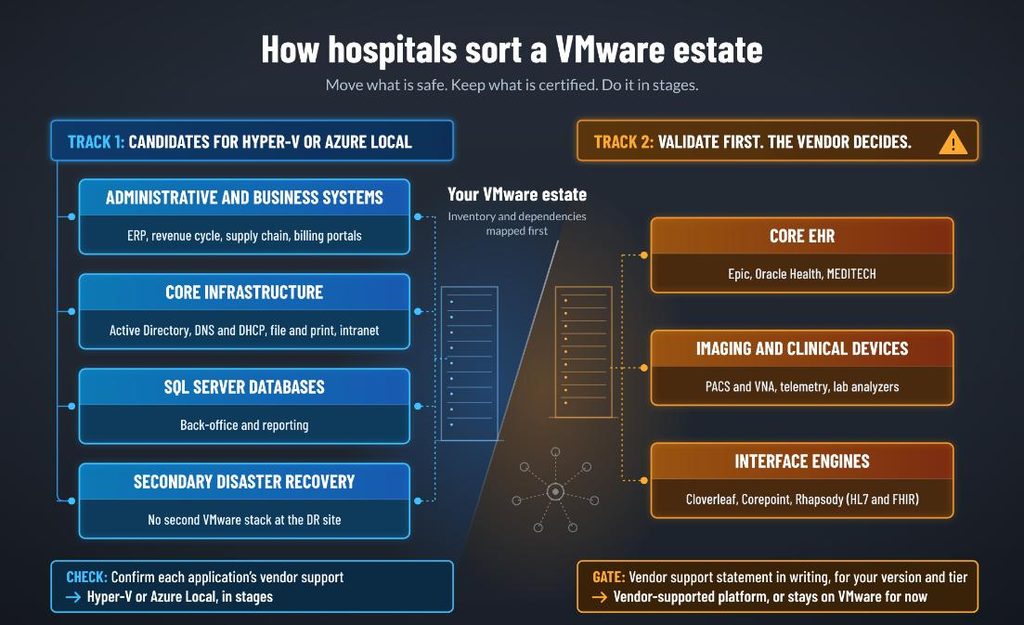
Clinical workloads run under uptime mandates, HIPAA obligations, and vendor validation matrices, so hospitals don’t convert everything on day one. They sort the estate into two tracks.
Track 1: Candidates for Hyper-V or Azure Local
| Workload | Why it is a candidate |
| Administrative and business systems (ERP, revenue cycle, supply chain, billing portals) | Mostly Windows-based and often the lowest clinical risk. Confirm each application’s vendor support, but in general this is where most hospitals start. |
| Core infrastructure (Active Directory, DNS and DHCP, file and print, intranet) | High Windows affinity, low clinical exposure, and easy to test. |
| SQL Server back-office and reporting databases | Microsoft supports its own server software on Hyper-V, and licensing you already own may cover the hypervisor. |
| Secondary disaster recovery | Hyper-V Replica and Azure Site Recovery can take over the job VMware Site Recovery Manager does today, so you don’t have to keep a second VMware stack running at the DR site. |
Track 2: Validate first. The vendor decides
| Workload | What gates the move |
| Core EHR (Epic, Oracle Health, MEDITECH) | The vendor’s current platform requirements for your version and tier. Non-production and auxiliary tiers can be treated differently from production database servers. |
| Imaging and clinical devices (PACS and VNA, telemetry, lab analyzers) | OEM-validated configurations. Run an interoperability audit before converting a single virtual disk. |
| Interface engines (Cloverleaf, Corepoint, Rhapsody) | They carry HL7 and FHIR traffic between instruments, monitors and the EHR. A network change mid-flight can drop admission, discharge and transfer messages, so stage the move and test message flow before and after. |
A word on the EHR, because it is where this goes wrong.
Epic, MEDITECH and Oracle Health each publish platform requirements to their customers. That guidance, not this post and not your hypervisor vendor, is the authority. The answer is not uniformly “No.” Epic and Microsoft announced Hyperspace sizing guidance for Hyper-V back in the Hyper-V 2012 R2 era and Nutanix says it was the first hyperconverged platform MEDITECH certified. But “supported at some point for some component” is not “supported for your version today.” Get it in writing, for your version and tier.
If the EHR can’t move yet, you still have options: right-size core counts and consolidate what stays on VMware, move to a platform the vendor has certified, or look at vendor hosting, which is one way to take the hypervisor question off the table. What you shouldn’t do is park it in Azure VMware Solution and call it savings. In 2025 Broadcom changed its rules so hyperscalers no longer sell VMware subscriptions for hosted VMware services. In other words, you bring your own licensing, which buys you time, not savings.
What a VMware to Hyper-V Migration Looks Like in Practice
A medical imaging provider that iShift supported has completed its migration from VMware to Hyper-V, moving its full estate of an estimated 400 virtual machines. The engagement started with a first phase of ten VMs, structured so the lessons from that phase would hold for the rest of the estate.
Here is what that structure put in place before anything moved:
- Non-critical first. The client picked the first-phase VMs, ranked by priority and application grouping. Business-critical workloads in later waves moved off-hours when they had to.
- Dependencies mapped, success defined. VM interdependencies and criticality were documented before cutover, and the client published success criteria for each application. “It works” didn’t count as a criterion.
- Exceptions named up front. VMs that couldn’t or shouldn’t move were identified and taken out of scope on purpose, instead of being discovered in a cutover window.
- No surprises on the network. IP addresses stayed the same, moves happened in agreed outage windows, and connectivity between the VMware and Hyper V environments was tested in both directions first.
- Compliance first, not last. HIPAA and any other regulatory requirements were gathered during discovery and design, not after the first cutover.
- Backups, monitoring and DR checked on Hyper V before each wave was signed off.
- A playbook at every stage. Each phase closed with documented lessons learned and a repeatable process for the next wave.
For applications built around VMware itself, support stayed best effort, with no guarantee they would behave the same on Hyper V.
Four Gates before Any Cutover
Before anything moves, whether it is the first ten VMs or the last wave, four things need to be settled. None of them is exotic engineering: a vendor support statement, a licensing model, a performance baseline and a compliance check. They are so common sense they are easy to put off. And that is why they cost the most when you find the gap after the cutover window is already scheduled.
- Get the vendor’s support statement in writing. For each clinical and third-party application, get the vendor’s current position on Hyper-V or Azure Local for your exact version and tier. Epic UserWeb, your Oracle Health support portal, MEDITECH’s customer documentation, or a written answer from the vendor all count. A verbal assurance from a sales rep does not.
- Model the licensing before you model the migration. f you already license Windows Server Datacenter with Software Assurance, Hyper-V is part of it; Azure Hybrid Benefit can waive Azure Local host fees when all physical cores are licensed. Now add the cost people forget: running both platforms at once. You will be paying Broadcom and Microsoft through the transition. One CloudBolt respondent put the unwind at 18 to 24 months, and Gartner says a full exit takes three years or more. Put that in the break-even.
- Baseline storage performance before you touch anything. Imaging and real-time charting need predictable, low-latency disk I/O. Capture IOPS and latency under real clinical load now, so you have something to compare against after cutover and a clear threshold for rolling back.
- Settle HIPAA for the migration itself, not just the destination. Microsoft’s HIPAA BAA covers in-scope Azure services (Azure Local has its own HIPAA guidance), so check every service in your migration path against the current list. The question people skip is the migration team. Anyone with access to a virtual disk that holds ePHI, including your integrator and any tooling vendor operating on your behalf, is a business associate and needs a BAA. Conversions that never leave your network are a different risk profile from replication into Azure. Know which one you are doing.
How the iShift Migration Team Helps
iShift is a Microsoft-focused infrastructure firm, so we lean toward Hyper-V and Azure Local where they fit. But we will also tell you when they don’t.
- Workload-to-platform mapping. We sort your estate into three buckets: move now, validate first, and leave alone for now. Destinations include Hyper-V or Azure Local, Nutanix AHV, Red Hat OpenShift Virtualization, Platform9, and an optimized VMware footprint for what has to stay.
- Testing in the PoV Migration Lab. We convert copies of your actual workloads in a dedicated environment, test them on Hyper-V, Nutanix, Red Hat, and Platform9, run stress-load benchmarks, and check vendor compatibility, so the first time anything runs on the new platform isn’t in production. The lab shows how your workload behaves. However, it doesn’t replace the vendor’s support statement and you still need that in writing.
- Pilot-first migration. We start with a small set of non-critical workloads, move them in agreed outage windows, and write up what we learned before the next wave. Your application owners define what “working” means and test it to confirm “success.”


Test it before you cut over
If you want to know which of your workloads are real Hyper-V candidates, and what that does to your renewal math, start with an infrastructure assessment. If you’d rather see it work first, run a test drive in the PoV Migration Lab and measure performance before you commit to a cutover window.