

When Two Collaboration Platforms Become One Too Many
Most organizations don’t intentionally choose platform sprawl. It just happens.
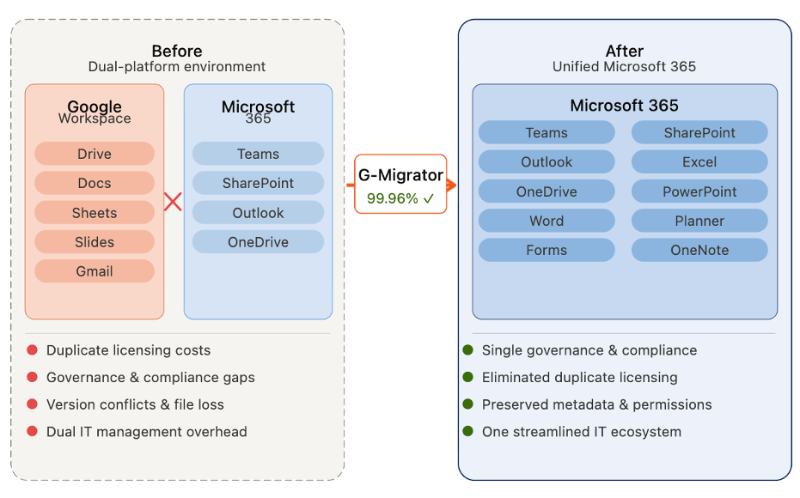
A rapidly growing solar energy company found itself exactly there: Microsoft 365 for daily workflows – Teams, Outlook, SharePoint – and Google Workspace for a sprawling library of critical business documents, intellectual property, and shared team drives that had never made the leap.
The result was friction at every level. Employees were jumping between platforms to find files. IT was managing two governance models. Leadership was writing checks for two ecosystems and neither one was fully pulling its weight.
In the end, the decision to consolidate everything into Microsoft 365 was pretty straightforward. The execution, however, was not.
The company needed a Google Workspace to Microsoft 365 migration that could handle tens of thousands of files, convert Google-native formats without data loss, preserve complex permission structures, as well as keep the business running throughout the transition.
They turned to iShift and our purpose-built G-Migrator enterprise migration platform.
The result: a 99.96% migration success rate, with preserved metadata, intact permissions, and zero significant business disruption.
Why Google Workspace and Microsoft 365 Don’t Play Well Together
Before diving into how we solved the problem, it helps to understand why migrating from Google Workspace to Microsoft 365 is harder than it looks.
1. The Hidden Costs of Running Dual Platforms
Google Workspace pricing ranges from roughly $7 to $22 per user per month depending on the plan. For a mid-size company, that is a six-figure annual line item on top of existing Microsoft 365 licensing.
But the financial case goes beyond licensing. Dual platforms create:
- Governance gaps: enforcing document lifecycle policies, access controls, and audit trails across two ecosystems is exponentially harder than managing one.
- Collaboration fragmentation: when half your files live in Google Drive and the other half in SharePoint, version conflicts and “which system is the source of truth?” debates become a daily tax on productivity.
- Compliance exposure: regulated industries need clear chain of custody for documents. Scattered storage makes that difficult to demonstrate.
2. The Technical Complexity of Moving from Google Workspace to Microsoft 365
Even after the business decision to consolidate platforms is made, the technical migration is non-trivial.
Google stores documents in proprietary formats, such as .gdoc, .gsheet, .gslides, that must be converted to their Microsoft equivalents (.docx, .xlsx, .pptx) to be usable in Microsoft 365. Without proper tooling, that conversion process introduces formatting errors, data corruption, or outright file losses.
An enterprise-grade migration from Google Workspace to SharePoint or OneDrive must also preserve:
- Folder structure and hierarchy
- File ownership and metadata
- Shared drive configurations
- User-level access permissions
- Version history (where possible)
Get any of those wrong and users spend weeks untangling access issues and recovering files post go-live.
Why We Didn’t Use Google Takeout (and You Shouldn’t Either)
A common question we get: can’t you just use Google Takeout? The short answer is: No, not for an enterprise Google Workspace migration.
Google Takeout is designed for individual users exporting their personal data. It was never built for platform-to-platform enterprise migrations. Below are some compelling reasons this is not the right tool for an enterprise-class migration away from Google Workspace.
- No direct migration path to Microsoft 365. Takeout is an export tool. It gets data out of Google but it doesn’t get data into SharePoint or OneDrive in an organized way.
- Permission structures don’t survive. Enterprise Google Drive environments are built on complex, layered sharing models. Takeout exports the files stripped of those permissions.
- No automated format conversion. Exported, you get Google-native files in a zip folder, not Microsoft-ready documents.
- No incremental migration. Enterprise migrations take time and users typically keep working during that window. Takeout is a one-time snapshot; it cannot sync changes made after the initial export.
- No audit trail or compliance controls. Enterprise IT teams need to verify file integrity, track migration events, and maintain data governance throughout the process. Takeout provides none of that.
- Poor scalability. For organizations with hundreds of users and large shared drives, Takeout becomes operationally impractical and error-prone.
For anything beyond a handful of personal files, having an enterprise migration platform is the only viable path for a successful cloud migration with minimal disruptions, losses, or downtime .
The iShift G-Migrator: Built for Enterprise Google Workspace Migrations
iShift G-Migrator is our purpose-built platform for automating large-scale Google Workspace to Microsoft 365 migrations. It was designed around four core capabilities that address the most common failure points in enterprise migrations.
1. Intelligent Data Discovery and Pre-Migration Assessment
Before any file moves, G-Migrator performs a comprehensive scan of the source environment analyzing file structures, types, sizes, ownership, and permissions across both personal and shared drives.
This pre-migration assessment identifies conversion blockers and complex permission scenarios before they become problems in production. It is the difference between a migration that surfaces issues during go-live and one that resolves them beforehand.
2. High-Fidelity Google-to-Microsoft Format Conversion
Automated, accurate format conversion is the technical heart of any Google Workspace to Microsoft 365 migration. G-Migrator handles the full conversion matrix:
- Google Docs -> Microsoft Word
- Google Sheets-> Microsoft Excel
- Google Slides -> Miscrosoft PowerPoint
If a file cannot be converted cleanly due to complexity or format limitations, the platform applies intelligent fallbacks: Docs and Slides export as PDF; Sheets export as CSV. No critical data is abandoned.
3. Distributed Ownership and Permission Mapping
Google Drive distributes file ownership across individual users rather than centralizing it. When migrating that structure into Microsoft 365, mapping each file to its correct owner and preserving access permissions for every user requires precision tooling.
G-Migrator handles this automatically, maintaining original folder hierarchies and ensuring users find their files exactly where they expect them in the new environment.
4. Resilient Migration Engine with Incremental Sync
Large-scale migrations routinely hit API throttling, export rate limits, and transient connectivity issues. G-Migrator’s resilient engine classifies errors, implements automatic retries, and handles exceptions without stalling the overall migration.
Crucially, the platform supports incremental migration. In other words, files created or modified during the migration window are synchronized before cutover. Users keep working. Nothing gets left behind.
How the Migration Was Executed: Phase by Phase
Phase 1: Discovery and Migration Strategy
Full inventory of all files, drives, and shared repositories. Identification of potential conversion issues and permission complexity. Migration strategy validated before a single file moves.
Phase 2: Pilot Migration
A controlled migration of representative data sets for the purpose of validating conversion accuracy, permissions mapping, and platform performance before committing to full scale.
Phase 3: Full Production Migration
Automated workflows processed the complete dataset: files exported from Google Workspace, converted to Microsoft formats where required, uploaded into Microsoft 365, and validated for integrity.
Phase 4: Exception Handling and Final Validation
A small subset of files required additional review, typically due to format limitations, export size restrictions, or API constraints. These were flagged for manual review or alternative conversion methods rather than silently dropped.
Migration Results: What a 99.96% Success Rate Looks Like in Practice
Data Integrity
Every migrated file retained its folder hierarchy, metadata, ownership record, and access permissions. Users logged into the new Microsoft 365 environment and found their files intact, in the right place, accessible to the right people.
Business Continuity
Incremental synchronization meant users continued working throughout the migration. There were no major service interruptions or forced downtime.
Operational Simplification
Eliminating the Google Workspace environment removed an entire layer of IT complexity. Security policies, compliance controls, and file governance now operate from a single platform.
Financial Impact
The financial case for completing the Google Workspace to Microsoft 365 migration was clear:
Reduced ongoing IT burden.
One platform means one set of governance policies, one compliance posture, and significantly reduced administrative overhead.effective email migration services.
Eliminated redundant licensing.
At $7–$22 per user per month, Google Workspace costs add up quickly for organizations already running Microsoft 365.
Lower migration cost than alternatives.
Some enterprise migration tools charge ~$390 per terabyte of data. G-Migrator’s purpose-built architecture for Google Workspace data structures minimized operational overhead and overall migration effort.
Reduced ongoing IT burden.
One platform means one set of governance policies, one compliance posture, and significantly reduced administrative overhead.
Key Takeaways for Organizations Evaluating a Google Workspace Exit
If your organization is weighing a Google Workspace to Microsoft 365 migration, a few things are worth internalizing from this project:
Don’t underestimate the permission problem.
Complex sharing structures are the most common source of post-migration support tickets. Mapping them correctly before migration is the only way to avoid user chaos at cutover.
Incremental sync isn’t optional for enterprise migrations.
If users can’t keep working during the migration window, you don’t have a migration plan, you have a maintenance window.
Format conversion quality matters more than speed.
A fast migration that delivers corrupted documents is worse than a slower one that delivers clean, usable files.
Manual tools and basic export utilities don’t scale.
Whether it is Google Takeout or ad hoc scripts, the lack of audit trails, permission mapping, and error handling makes them unsuitable for anything beyond small, low-stakes migrations.

Modernize Your Collaboration Environment with iShift
The solar energy company in this project did not just move files. They eliminated a dual-platform headache, improved governance, reduced licensing costs, and put their entire document infrastructure under a single, well-governed Microsoft 365 environment without losing a single business day in the process.
Ready to plan your Google Workspace to Microsoft 365 migration?