
A newly disclosed, actively exploited VMware vCenter vulnerability has thrust virtualization security straight back into the executive hot seat.
Let’s be clear: this isn’t a call to panic-dump VMware over a single patch cycle. Vulnerabilities happen across every enterprise stack. But it does surface a much tougher, more strategic question for IT leaders:
If circumstances forced you to reconsider your virtualization platform tomorrow, could you actually do it?
For years, VMware was the undeniable default. Along the way, thousands of enterprise workloads, operational processes, networking configurations, backup workflows, disaster recovery strategies, and team skill sets became deeply entangled in the ecosystem.
The emergence of CVE-2026-59310 is more than just another patch ticket. It is a high-stakes reminder that platform lock-in is an operational risk, a reason to evaluate your VMware exit strategy and infrastructure readiness.
The Breakdown: What Happened with CVE-2026-59310?
On July 29, 2026, Broadcom issued VMware Security Advisory VMSA-2026-0006 (updated to VMSA-2026-0006.1 on August 3), highlighting severe flaws across VMware ESX, vCenter, Workstation, and Fusion.
Two of the vulnerabilities in that advisory were rated Critical with a maximum CVSS v3 score of 9.8: CVE-2026-59309, an authentication-bypass flaw in VMware Directory Service, and CVE-2026-59310, a directory traversal vulnerability in vCenter’s Syslog server. Broadcom says an attacker with network access to vCenter can exploit CVE-2026-59310 to execute arbitrary code, and that there is no workaround – organizations running affected versions must apply the appropriate patches.
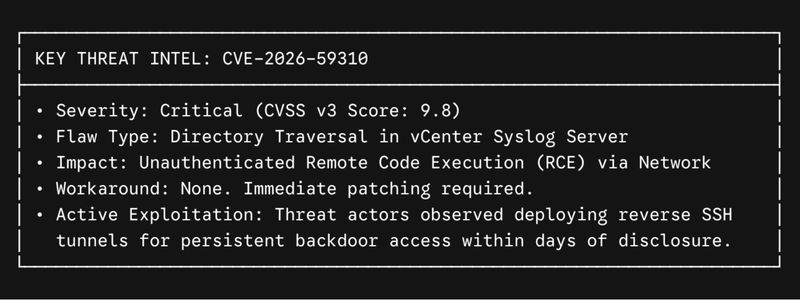
Security researchers have since reported active exploitation of CVE-2026-59310. Attackers have been observed deploying reverse SSH tooling after exploitation to maintain persistent remote access to compromised environments, with activity linked to hundreds of IP addresses across dozens of countries — though an affected IP address shouldn’t automatically be read as an individual compromised organization.
The speed is notable, too. Malicious activity reportedly began within days of public disclosure. For infrastructure teams, that shrinking window between disclosure and exploitation is becoming increasingly hard to ignore.
Not Just a VMware Security Story
It would be easy to treat CVE-2026-59310 as just another VMware vulnerability to patch. Operationally, that is correct: organizations on affected versions should evaluate their exposure and follow Broadcom’s remediation guidance now.
Strategically, it raises a different question: how dependent is your organization on its current virtualization platform?
For years, VMware was the default virtualization platform for most enterprises, and entire operating models formed around vSphere, ESXi and vCenter. That created both real value and real dependency.
Why Organizations Are Rethinking Their VMware Dependency
Today, organizations are reassessing that dependency for reasons that include:
- VMware licensing and subscription changes
- Infrastructure and virtualization costs
- Vendor concentration
- Security and operational risk
- Data center modernization initiatives
- Hybrid cloud strategies
- Hardware refresh cycles
- Business continuity requirements
- Changes following Broadcom’s acquisition of VMware
A critical security event doesn’t necessarily change the answer to those questions. However, it can increase the urgency of asking them.
Building a VMware Exit Strategy
A VMware exit strategy is fundamentally about creating options. Some organizations keep part of their VMware footprint while migrating select workloads. Others move toward Microsoft Hyper-V, another private cloud platform, or public cloud infrastructure. The right destination depends on the workloads, applications, business requirements and economics of each environment.
The first step is understanding your current position.
What Does VMware Exit Readiness Actually Look Like?
Before evaluating a VMware alternative, organizations need to understand what they are actually running. This statement sounds obvious, but in real life large VMware environments carry years of accumulated infrastructure decisions.
A proper VMware environment assessment goes beyond VM counts. It should give you visibility into:
- Workload inventory and dependencies — which applications run on which VMs, which systems communicate with one another, and which workloads are business-critical.
- Operating system compatibility — legacy Windows and Linux workloads may need different migration approaches than modern operating systems.
- Storage requirements — architecture, performance, capacity and dependencies that influence the target platform.
- Networking — VLANs, virtual networking, firewall rules, IP addressing and application dependencies that must be understood before workloads move.
- Backup and disaster recovery — how workloads will be protected and recovered on the target platform.
- Migration complexity — some VMs move easily; others need remediation, testing or application changes.
- Operational processes — monitoring, patching, automation, security controls and IT workflows that may depend on the existing VMware environment.
Such an assessment produces something valuable: a map of your infrastructure and your available paths forward.
Security Is One Part of Infrastructure Resilience
CVE-2026-59310 also shows why virtualization belongs in broader cybersecurity and resilience conversations. Virtualization management infrastructure controls a large share of an organization’s compute environment, so compromising it — depending on the architecture and privileges involved — can create significant risk.
Thus, basic security practices matter: restrict management-plane access, maintain network segmentation, monitor administrative activity, keep infrastructure current, and apply patches based on organizational risk.
But resilience goes beyond patching. Consider what happens when a platform needs an urgent upgrade, when hardware reaches end of life, when licensing changes unexpectedly, or when a business decision forces infrastructure transformation. Organizations in the strongest position are usually the ones that already understand their alternatives.
Don’t Let the Next Security Event Make the Decision for You
Rushed migrations carry risks of their own. The better approach is preparation.
If VMware still meets your organization’s technical, financial and operational requirements, understanding your environment still makes you better prepared to manage it. If you are already weighing VMware migration or alternatives, now is a good time to move from discussion to assessment.
Ask: What depends on VMware today? If we needed to change direction, could we?
Build Your VMware Exit Strategy Before You Need It
The recent VMware vCenter security event matters and affected organizations should address it. But the larger lesson extends beyond CVE-2026-59310: infrastructure strategy shouldn’t begin only when a licensing change, security incident, hardware deadline, acquisition or executive mandate forces action. Organizations that understand their environments and migration options can make such decisions deliberately, not reactively.
At iShift, we help organizations assess VMware environments, identify workload and infrastructure dependencies, evaluate VMware alternatives, and develop practical migration strategies based on business and technical requirements — whether your destination is Microsoft Hyper-V, Nutanix, Platform9 PCD, Red Hat OpenShift, another private or public cloud, or a hybrid architecture.
The goal isn’t simply to leave VMware. The goal is to know that you can.

Ready to see where your infrastructure stands?
Map out your path forward on your own terms before the next major security event forces your hand.